Orders from the table — straight to the kitchen.
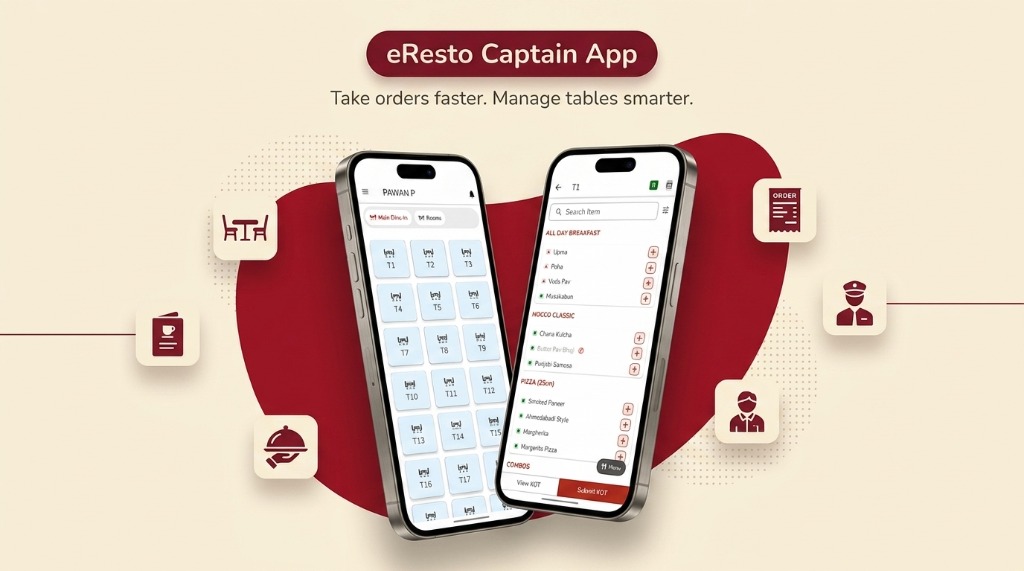
Captains punch orders tableside on their Android phone. The order fires to eresto Edge and the kitchen in one tap — no paper KOTs, no walking back to the counter, no re-keying.
More speed on the floor. Less running around.
From the moment a guest is seated to the KOT reaching the kitchen, eresto Captain eliminates every paper slip, every round trip to the counter, and every mis-keyed item.
Tableside ordering on Android
The captain browses the same live menu loaded in eresto Plus, selects items and quantities tableside, and fires the KOT in one tap — all from their own Android phone.
Instant sync to Edge & KDS
The moment a KOT is fired from Captain, it appears simultaneously in eresto Edge (POS) and on the eresto KDS kitchen screen. Zero re-typing, zero delay, zero missed tickets.
Table & session management
Captains see all open tables, their session status and running bill totals from a single screen. Transfer a guest, merge tables or check what's outstanding without touching the counter.
Add to ongoing orders
When a guest orders more mid-meal, the captain adds items to the existing table order. The incremental KOT fires to the kitchen and the bill in Edge updates automatically.
Live menu — always in sync
The menu on Captain reflects whatever is currently published in eresto Plus — including item availability, prices and session-specific menus. No stale paper menus.
Role-based permissions
The admin controls exactly what each captain can and cannot do — including whether they can generate or print an invoice. Full detail in the section below.
You decide what each captain can do.
The restaurant admin — from eresto Plus — controls exactly what every captain is permitted to do. The most critical permission: whether a captain can generate and print an invoice, or whether billing must always go through the counter.
- ✓ Invoice permission off (recommended): Captain takes orders and fires KOTs. Only the billing counter (eresto Edge) can settle and print. Keeps financials tightly controlled — no unauthorised billing.
- ✓ Invoice permission on: Trusted senior captains or section heads can raise and print a final bill directly from their phone — useful where table ownership is fixed.
- ✓ Per-captain configuration: Permissions are set per individual, not per role group — give senior staff more access without changing settings for the whole team.
- ✓ All changes live in eresto Plus: The admin updates permissions from the browser-based eresto Plus back-office. Changes take effect on the captain's phone immediately — no app reinstall.
Captain works with eresto Edge — not without it.
Captain is a floor-side ordering companion, not a standalone POS. Here's exactly how the two apps divide the work.
It is part of eresto One. Captain sends orders to Edge; Edge confirms them, fires the KOT, and handles billing and settlement. Without Edge running at the counter, Captain has nowhere to send orders. Learn about eresto Edge →
Captain connects to the whole floor.
eresto Captain works alongside eresto Edge and eresto KDS on the floor. Above the floor, eresto Plus — browser-based — is where every permission is set and all reports are read.
eresto Plus — online back-office, settings & reporting
Browser-based, runs anywhere. Set captain permissions, build menus, track inventory and expenses, run promotions and pull live reports.
eresto Captain
Tableside ordering on Android. Takes orders, fires KOTs, manages table status.
← You are hereeresto Edge
POS & billing. Receives Captain's orders, confirms, prints KOTs, settles bills.
Fires KOTs to → KDS
eresto KDS
Kitchen display. Every KOT from Captain (via Edge) appears instantly with SLA timing.
From the table to the kitchen — in one tap.
Captain slots into the middle of the order flow. Either way, the order travels the same zero-re-entry path.
Captain takes the order
Captain opens the table on their phone, selects items from the live menu, and reviews with the guest.
KOT fired in one tap
Captain taps Fire KOT. The order pings eresto Edge and the KDS kitchen screen simultaneously.
Kitchen prepares
The KDS shows the order live. Kitchen marks each dish delivered. Edge and Captain both reflect this.
Bill settled at counter
Edge raises and settles the invoice — or the captain does, if they have invoice permission enabled.
eresto Captain, explained.
Can eresto Captain be used without eresto Edge?
Can a captain generate and print a bill from their phone?
How many captains can be on the app at once?
Does the captain see the same menu as the guest's QR menu?
What Android device does a captain need?
See Captain and Edge working together live.
30 minutes. We'll demo the full order flow — from the captain's phone to the kitchen screen to the settled bill. No commitment required.