Restaurant Queue Management in 2026: Moving from a Paper Waiting List to a Digital Queue Manager
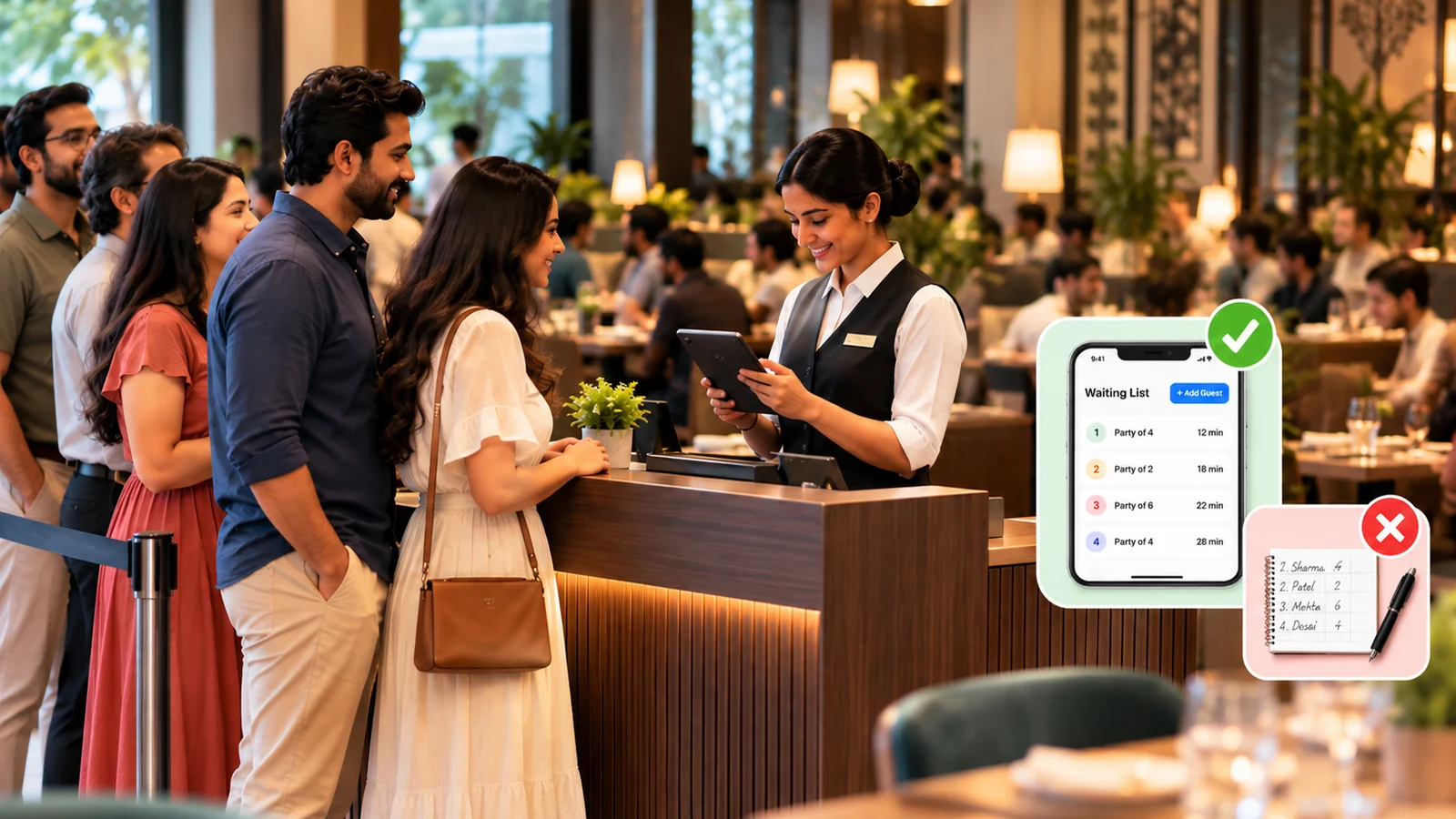
It is 8:30 PM on a Saturday. Every table is occupied. Six groups are waiting near the entrance and two more have just walked in. At the reception desk is a notebook with names, number of guests and the time each group arrived.
A four-seater in the corner is being cleared, and the receptionist has about thirty seconds to decide who gets it. Is the family of four from 8:05 still here, or did they leave without saying? The couple behind them has waited almost as long, but seating two people at a four-seater means the next family waits longer still. Someone at the back says they were “told fifteen minutes” twenty minutes ago. A waiter wants to know whether the group of six can have table 12 — but table 12 has only asked for the bill.
None of this is unusual. It is what a waiting list turns into when the restaurant is full. On a quiet afternoon, a waiting list is a list of names. At peak hours it becomes an operational workflow: matching parties to tables, tracking who has waited longest, confirming who is still present, and keeping the reception, the floor staff and the guests informed — continuously, for two or three hours.
Many busy restaurants in India still run this workflow on paper. That is not carelessness; the notebook works on a Tuesday afternoon. The problem is that paper does not scale with the queue, and it fails at exactly the moment the restaurant can least afford it.
This article covers why manual waiting lists break down under pressure, what a restaurant queue management system actually does, what changes on a busy night, and what to look for if you are considering one. It is about guests waiting for a table — not the token or order-number queues used at quick-service counters — a different problem with different tools.
Why Pen and Paper Stops Working as the Queue Grows
With three groups waiting, a notebook is adequate. The receptionist knows everyone by face, remembers who came first and can see the floor. The difficulties begin as volume rises, and they compound each other.
The list lives in one place, with one person. Floor staff clearing tables cannot see it and the manager on the floor cannot see it. Every question — “how many waiting?”, “who is next?”, “is the group of eight still here?” — goes through the one person holding the pen, who is also greeting new arrivals and answering the phone. When that person steps away and someone else covers, the notebook passes on names and times, but not which group said they would be back in five minutes, which one was promised the window table, or which one has already been called twice.
Waiting time is a guess. Arrival times get written down, but nobody is working out elapsed time for every group while managing the door. So the quoted wait is gut feel, and it is the same for everyone regardless of party size. A couple can quietly wait longer than a group seated before them because no two-seater came up — and nobody notices until they complain.
Party size and table size rarely line up. Tables free up in an order that has nothing to do with the order guests arrived. A six-seater opens while the next three groups are couples. Seating a couple there wastes the table; skipping them invites an argument. On paper, the receptionist makes these trade-offs from memory, under time pressure, with guests watching.
Calling a guest means shouting, walking or dialling. When a table is ready, someone has to find the party: call out a name across a crowded waiting area, step outside to look, or dial a number copied from the notebook. If they do not respond, how long do you hold the table? Meanwhile it sits empty and the next group grows restless.
Mistakes stay hidden until they cause a scene. An illegible name, a 4 that was really a 6, a group ticked off by mistake, the same party written down twice by two staff members — on paper these surface only when the wrong guests are called, or when a family that has waited forty minutes finds their name was skipped.
None of these problems is dramatic alone. Together, on a full Saturday night, they produce avoidable delays, avoidable errors and a front desk that is reacting rather than managing.
What a Restaurant Queue Management System Actually Does
Strip away the jargon and a queue management system — sometimes called restaurant waitlist software — does a small number of things well.
It keeps the waiting list as a live digital list. Each entry has the guest’s name, phone number, party size and the time they joined, so the host can see at a glance who has waited longest and which party sizes are in the queue.
It turns calling a guest into a single action. When a table is ready, the host calls or notifies the guest from the system rather than shouting a name or copying a number. Some systems can also announce the guest’s name over a speaker. If the guest does not respond, the host can skip them or give them a fixed time to arrive, after which they are marked as a no-show and the queue moves on.
It lets guests join the queue themselves, usually by scanning a QR code or opening a link, which takes the writing-down work off the receptionist during the busiest twenty minutes of the evening, with staff simply confirming each entry. And because the list lives in a system, more than one person can see it — the host at the door and the manager on the floor — from a phone, which is where restaurant queues actually happen.
Some systems add reservations, guest history or a link to the billing system. But the core is the list, the timing, the call and the no-show handling. If those work reliably on a phone at the entrance, most of the problems above are addressed.
What Changes on a Busy Night
Fewer avoidable errors. Entries are typed rather than scribbled, every entry carries its own time stamp, and two staff members managing the door work from the same list rather than two notebooks. “Who came first?” stops being a matter of memory. A system does not eliminate mistakes — a wrong party size can still be entered — but it removes the most common ones and makes the rest visible.
Ready tables can be filled sooner. This is the benefit worth being precise about. A queue management system does not make guests eat faster and does not create tables, so it does not change how long each table takes to turn. What it can do is shorten the gap between a table becoming available and the right party sitting at it. On paper, that gap is spent identifying the right party, finding them and deciding what to do if they do not respond. With party sizes and waiting times visible at a glance and a one-tap call, that gap can shrink. Across a three-hour dinner service and fifteen or twenty tables, reducing those avoidable delays helps improve table utilisation.
A more predictable wait for the guest. In our experience, guests mind not knowing more than they mind waiting. A guest who has registered on the queue and knows they will be called does not have to stand at the door, keep asking the receptionist, or worry that their name was missed. They can wait in the car or at the shop next door and walk in when called. The restaurant’s first impression is an organised one, before the guest has even been seated.
What to Look for in Restaurant Waiting List Software
A few practical questions matter more than a long feature list.
Six questions to ask before you choose. Use these to judge whether a queue system will hold up at your door on a busy night.
- Does it run on a phone? The queue happens at the entrance. A system tied to a desktop at the billing counter will not be used by the person standing at the door.
- Can guests join without an app? Asking a walk-in guest to install an app to wait for a table is a hard sell in India. A QR code or link that opens in the browser is the practical option.
- Does it record party size and waiting time for every entry? These two fields are what turn a list into a working tool.
- How does it handle no-shows? Look for a clear, configurable way to skip or time out a party and advance the queue.
- Can you separate different kinds of waiting? Walk-ins, reservations, takeaway pickups and large groups often need to be handled differently.
- Is it simple enough that staff will use it at 8:30 PM? This is the test that matters most. A system that needs attention during the rush will be abandoned for the notebook by the second weekend.
How eresto Queue Handles the Waiting List
eresto Queue is built around the situation described above: a busy entrance, a notebook, and a receptionist holding too much in their head. It is an app for restaurant staff — the whole waiting list runs from a phone, so the host is not tied to a desk or a terminal.
Staff can register a waiting guest in the app, or guests can register themselves by scanning a QR code or opening a link on their own phone — nothing to install. A self-registered guest appears in the app, where staff approve or acknowledge the entry. Each entry records the guest’s name, number and party size, and the host sees the full live queue at a glance. When a table is ready, the host calls the guest from the app in one tap. If the guest does not arrive within a configurable timeout — five minutes by default — the system marks them as a no-show and advances the queue.
eresto Queue can also announce guests. With a Bluetooth speaker connected to the staff phone, the app plays the guest’s name aloud when their table is ready, as an alternative to calling — so nobody has to shout across the waiting area or dial a number.
Tags separate walk-ins, reservations, takeaway and VIP guests into different lines, and because the queue lives in the system rather than in one person’s notebook, a shift change does not lose it. Every guest who joins is saved as a contact, and returning guests are matched by phone number, so the host can see they have visited before and what they ordered last time.
eresto Queue is available on its own, starting at ₹799 per month, or as part of eresto One, where it connects with eresto Edge so that table status updates automatically.
The Waiting List Is the First Thing Your Guest Experiences
Most restaurant technology decisions are about what happens after the guest sits down — ordering, the kitchen, billing. The waiting list is what happens before, and on a busy night it shapes the guest’s first ten minutes and the front desk’s entire evening.
Pen and paper is not wrong. It is the wrong tool once the queue is long enough that keeping it in order becomes a job in itself. If your Saturday nights look like the scene at the start of this article, restaurant queue management is worth taking seriously. A waiting list that is easier for staff to run is easier on the guests in it, too — and worth seeing in action.
Ready to Move Off Paper?
Book a demo and we’ll walk you through eresto Queue with your own restaurant’s entrance in mind.
Book a Demo with eresto →Frequently Asked Questions
What is restaurant queue management?
Restaurant queue management is how a restaurant organises guests waiting for a table: recording who is waiting, in what party size and since when, and seating them in the right order as tables become available. A queue management system does this digitally instead of on paper, and usually adds guest self-registration, one-tap calling and no-show handling.
Is there an app for managing a restaurant queue?
Yes. A restaurant queue manager app runs on the staff’s phone: staff add waiting guests or review guests who register themselves, see the live queue and call guests when their table is ready. Guests usually register by scanning a QR code, so nothing needs to be installed on their side.
Is a restaurant queue system the same as a token system?
No. A token system is used at quick-service counters to call order numbers when food is ready. A restaurant queue or waitlist system manages guests waiting for a dine-in table. Both get called “queue management”, so it helps to be clear which problem you are solving.
Can a queue management system reduce waiting time for guests?
It cannot create more tables, so it does not change the underlying wait when the restaurant is full. It can reduce the avoidable part of the wait — the time a ready table sits empty while staff work out who is next and find them — and it makes the wait more predictable for the guest.
Do guests need to download an app to join a restaurant waitlist?
Not with most current systems. Guests scan a QR code or open a link and register in the browser. An app download is a barrier for walk-in guests, so it is worth checking before choosing a system.
Can a restaurant announce guest names instead of calling them?
Yes. A queue manager app can play the guest’s name through a Bluetooth speaker connected to the staff phone when their table is ready, so staff do not have to shout a name or dial a number. It works best for guests waiting within earshot of the entrance.
What happens if a guest does not respond when their table is ready?
A good system lets the host skip the party or gives them a set time to arrive, then marks them as a no-show and calls the next guest, so a ready table is not held for someone who has left.
Is restaurant waitlist software only for large restaurants?
No. What matters is not size but whether guests regularly wait for tables. A 40-cover family restaurant with a queue every weekend has more to gain than a 150-cover restaurant that rarely fills up.